

Developer notes
Find the JSON you need with JSONPath and Pointer.
Query nested JSON with JSONPath, select an exact value with JSON Pointer, and export results without rounding large IDs.
By KeepSimp 4 min read
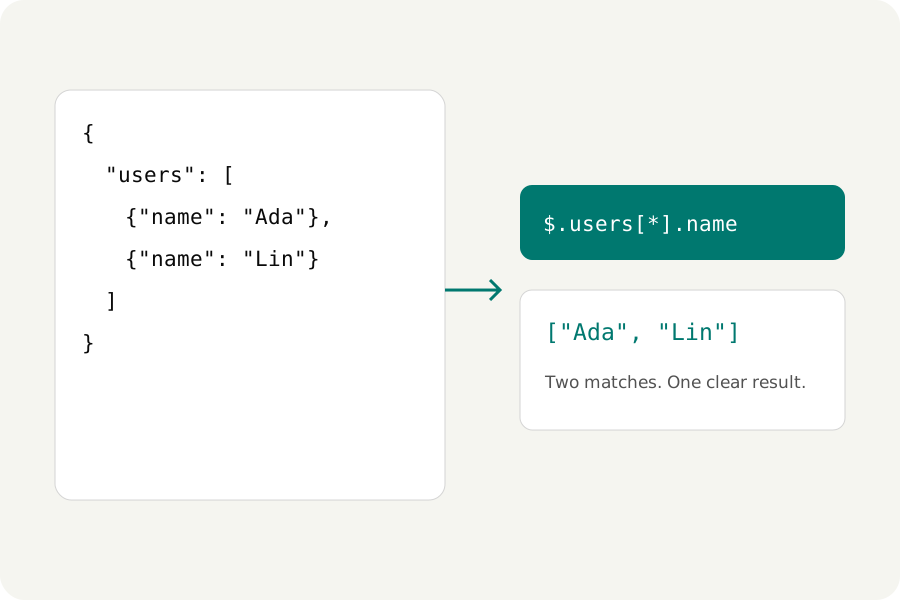
A long response often contains a small answer. KeepSimp's Query workflow helps you select that answer, while Explore shows where it sits in the document. Your source stays available, and results appear separately for inspection, copying or download.
Choose a query or an exact address.
JSONPath selects zero, one or many values. Start at $ for the root; $.users[*].name selects every user's name, $..id searches descendants, and $.users[0:2] selects the first two users. KeepSimp returns a JSON array of matches and lists their JSON Pointer addresses.
JSON Pointer identifies one value. /users/0/name selects the first user's name, and an empty pointer selects the whole document. A property called a/b uses /a~1b; a literal tilde uses ~0. JSONPath results are arrays even for one match, while Pointer returns the selected value itself.
{"users":[{"id":1,"name":"Ada","role":"editor"},{"id":2,"name":"Lin","role":"viewer"}]}Filter, then inspect the matches.
Choose Query, keep JSONPath selected, and enter $.users[?@.role == "editor"].name. Run query returns ["Ada"] for the example. The query syntax follows RFC 9535 through the bundled JSONPath library; expressions do not execute pasted JavaScript or fetch a URL.
Explore offers an expandable tree and a search across keys, values and paths. Select a row to read its value and copy its pointer. Preview replacement proposes a change without editing your source. Table view accepts an array of objects; select an inner array with Pointer and choose Use result as source to explore it as a table.
Keep exact text, and understand filter limits.
Selected results come from the original JSON tokens. A value such as 9007199254740993 retains that exact spelling in Pointer and ordinary JSONPath selections. Filters use JavaScript numeric values; KeepSimp rejects documents with numbers that would overflow, underflow, round their decimal text or exceed the safe integer range before running a filter. Quoting IDs lets you compare them as strings.
Queries are limited to 2,000 characters and 10,000 matches. The path list shows the first 100 addresses; the downloaded result contains every accepted match. Duplicate property names must be made unique before querying, so selection cannot silently pick one interpretation.
Further reading
Topics: JSONPath · JSON Pointer · JSONPath tester · query JSON online · JSON search
A little less theory. A little more doing.
Try it on your own terms, with a free browser tool.
Try the tool