

A little know-how
The right shape, every time.
The shape, size, length and safe zones of a video for Instagram, TikTok, YouTube Shorts, Facebook, X, LinkedIn, Pinterest and Snapchat, each from the platform's own help, read on 25 October 2026.
By KeepSimp 6 min read
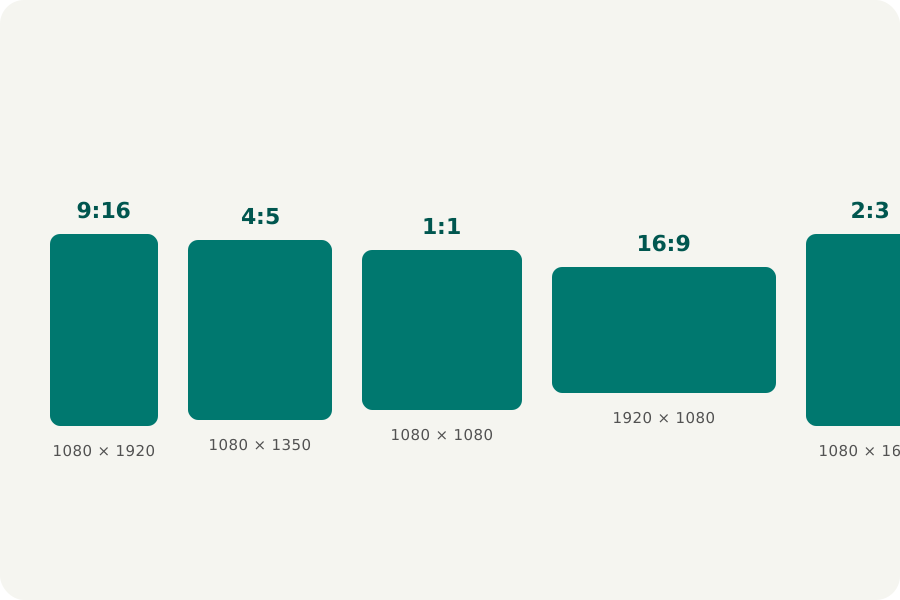
Every platform has a shape it fills, limits on how long and how large a video may be, and parts of the screen its own buttons cover. Here is what each platform's own help says, read on 25 October 2026, and what the Reel maker does with it.
Tall: 9:16 at 1080 × 1920.
Instagram Reels, TikTok, YouTube Shorts, Facebook Reels, Snapchat Spotlight and Pinterest video Pins all fill a phone at 9:16. Instagram takes Reels of up to 20 minutes and recommends only those of 3 minutes or less to new audiences; YouTube counts videos of up to 3 minutes as Shorts and shows them at up to 1080p; Facebook takes Reels of any length; Snap's newsroom gives 5 minutes for uploads to Spotlight; Pinterest's Pin specs give 4 seconds to 5 minutes.
TikTok's specifications for video ads recommend 9:16 at 540 × 960 or more. Its help pages give different lengths for uploads, so no length is given for it here.
Square, portrait and wide.
Instagram's feed shows 4:5 and square videos as well as tall ones. LinkedIn takes shapes from 1:2.4 to 2.4:1, up to 15 minutes and 5 GB; a square works on phones and computers. X takes 1:2.39 to 2.39:1, up to 140 seconds and 512 MB without Premium, at most 40 frames a second from a computer; widescreen 16:9 is its usual shape. YouTube's own videos are 16:9, up to 15 minutes until the account is verified, and up to 256 GB.
Safe zones: where the buttons go.
Pinterest gives its own numbers for video Pins: keep 270 pixels at the top, 65 on the left, 195 on the right and 790 at the bottom free. Meta's guide for Instagram Reels ads keeps 14% at the top, 35% at the bottom and 6% at each side free; Google's guide for YouTube vertical ads keeps 288, 672, 48 and 192 pixels free at the top, bottom, left and right. Those two are written for ads, but the buttons over ordinary videos sit in the same places.
TikTok publishes its safe zones only as template files and Snapchat's are in a picture, so the Reel maker shows none for them. For the others, Safe zones in the editor shades the parts on your reel while you work.
What the Reel maker does with it.
Choose the platform and the reel takes its shape at its usual size; the export window warns when the reel would be longer or larger than the platform's own help allows, and names the page. Platforms change their limits, so the date each was read is shown beside it.
Further reading
- Instagram Help: Reels (opens in a new tab)
- Instagram Help: the shape, size and frame rate of a reel (opens in a new tab)
- Meta Ads Guide: Instagram Reels video (opens in a new tab)
- TikTok Ads Manager: video ad specifications (opens in a new tab)
- YouTube Help: three-minute YouTube Shorts (opens in a new tab)
- YouTube Help: upload YouTube Shorts (opens in a new tab)
- Google Ads Help: YouTube vertical video ads (opens in a new tab)
- YouTube Help: upload videos longer than 15 minutes (opens in a new tab)
- YouTube Help: recommended upload encoding settings (opens in a new tab)
- Meta Business Help: Facebook Reels (opens in a new tab)
- Snap Newsroom: longer Spotlight videos (opens in a new tab)
- X Help: how to share and watch videos on X (opens in a new tab)
- LinkedIn Help: share videos on LinkedIn (opens in a new tab)
- Pinterest Help: Pin specs (opens in a new tab)
Topics: video sizes for social media · instagram reel size · tiktok video size · youtube shorts size · 9:16 resolution · safe zones · video length limits
A little less theory. A little more doing.
Try it on your own terms, with a free browser tool.
Try the tool