

A little know-how
From MOV, WebM or MKV to an MP4 that plays everywhere.
Turn iPhone MOVs, WebM screen recordings and MKV files into MP4s that play everywhere, copied as they are when they can be, in your browser. No uploads.
By KeepSimp 4 min read
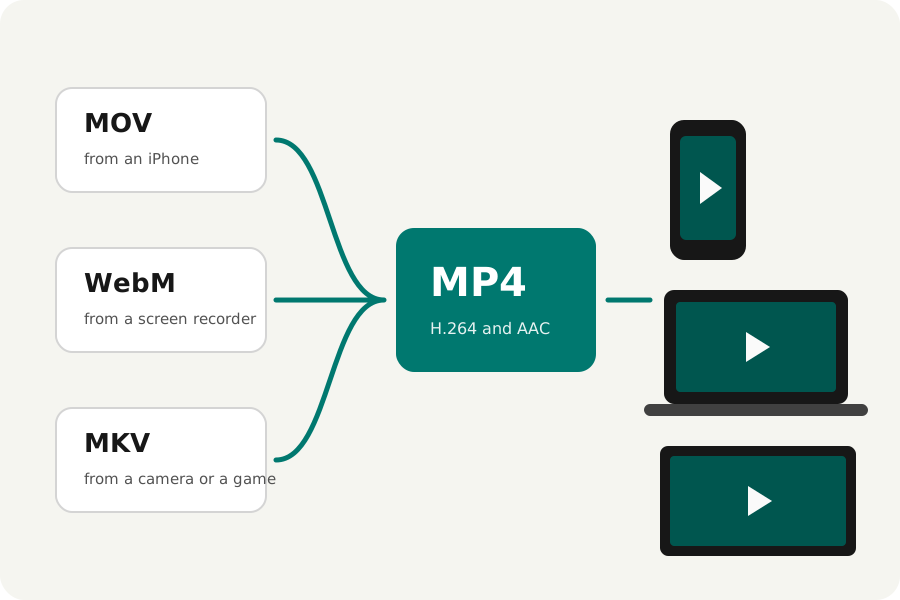
A video plays on your phone and nowhere else; a site refuses a screen recording; a TV will not open a camera's file. Usually the answer is an MP4, and often the picture inside does not need to change at all. Here is how to make one on your own device, and when it has to be encoded again.
MOV to MP4, from an iPhone or a Mac.
An iPhone records MOV files with HEVC pictures (or H.264 when Most Compatible is chosen in its camera settings). MOV and MP4 are close relatives, so an H.264 or HEVC picture is copied into the MP4 as it is, in seconds, with nothing lost. The phone's turn stays a setting that players follow.
HEVC plays on Apple devices and most recent phones and computers, but not everywhere. For a file that must play on anything, choose H.264 as the codec: the picture is then encoded again, at YouTube's recommended bitrate for its size.
WebM to MP4, from a screen recorder or the web.
WebM files hold VP8, VP9 or AV1 pictures and Opus sound. An MP4 can hold VP9 and AV1, but QuickTime and older devices cannot play them there, so by default the picture is encoded again as H.264 and the sound as AAC: the MP4 then plays everywhere. If you only need it to play in browsers, choose VP9 or AV1 as the codec and it is copied instead.
MKV to MP4, from a camera, a game or a download.
MKV holds almost any codec. When its picture is H.264 or HEVC it is copied into the MP4 as it is. Sound in AC-3 or DTS, common in films, does not play everywhere in an MP4, so it is converted to AAC; if your browser cannot play that sound, the page says so and offers to keep it as MKV or leave it out.
How to do it.
Open the Video converter, drop your files and leave the format on MP4. The sentence under the player says whether the picture is copied or encoded again and why. Each file is converted as soon as it is read, checked, and offered for download, alone or in a ZIP with the others.
The MP4 has its index at the start (fast start), as YouTube asks, so it starts playing before it has all loaded. Nothing is uploaded: the files never leave your device.
Further reading
Topics: MOV to MP4 · WebM to MP4 · MKV to MP4 · convert iPhone video to MP4 · HEVC to H.264 · MP4 converter · video converter no upload
A little less theory. A little more doing.
Try it on your own terms, with a free browser tool.
Try the tool