

A little know-how
Every picture, in the shape it is shown.
Crop a video to 9:16 for Reels, Shorts and TikTok, to a square or to 4:5, in your browser, many at once. Nothing is uploaded.
By KeepSimp 3 min read
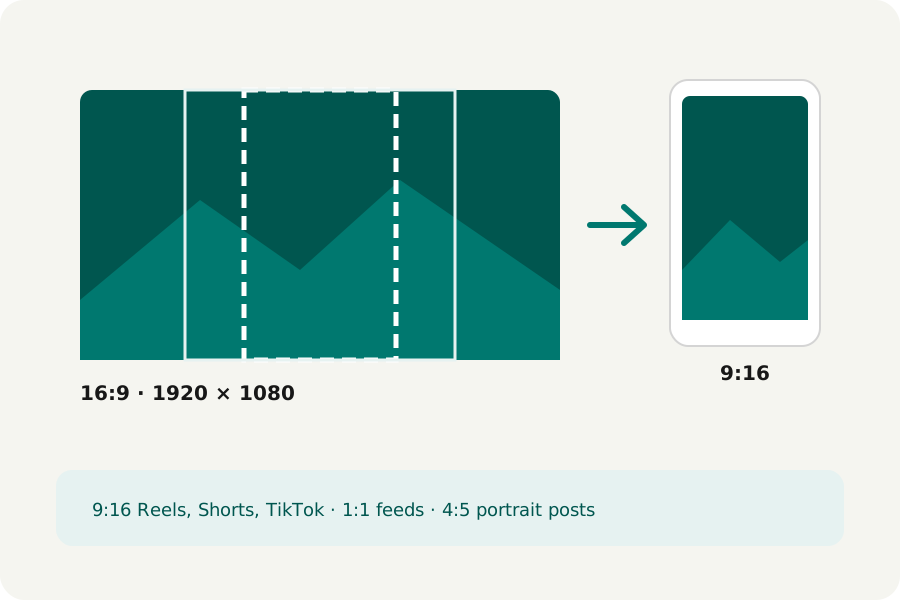
A wide recording looks small in a feed made for phones held upright. Cropping it to the shape where it will be shown fills the screen. KeepSimp's crop does it on your device, to the common shapes, many videos at once.
Which shape for where.
9:16 is a phone held upright: Instagram Reels, YouTube Shorts and TikTok. 1:1 is square, for feeds; 4:5 is a little taller, for portrait posts. 16:9 is widescreen, for YouTube and TVs, and 4:3 suits older screens and slides.
Each picture is cut to the shape around its middle, keeping as much of it as the shape allows: a 1920 × 1080 video becomes 608 × 1080 at 9:16, or 1080 × 1080 square. A video already within a hundredth of the shape is left whole.
How to crop.
Open Crop video and drop your videos; 9:16 is chosen to start with. Choose another shape if you need one, and a turn first if a video lies on its side: the shape is cut after the turn. Each video is written, opened again and checked, and offered for download alone or in a ZIP.
Cropping means the picture is encoded again, by your browser's own encoder, at YouTube's recommended bitrate for its new size unless you choose a quality or a size limit. The sound is copied as it is.
When the middle is not the place.
A shape is cut around the middle. If what matters is to one side, use Crop by hand: drag the box over the picture, or move it with the arrow keys, locked to a shape or free, and that video keeps its own crop. Nothing is uploaded: the videos never leave your device.
Further reading
Topics: crop video · crop video to 9:16 · vertical video for reels · square video · 4:5 video · change video aspect ratio
A little less theory. A little more doing.
Try it on your own terms, with a free browser tool.
Try the tool