

Put the pages in the order they belong.
Reorder PDF pages, add a blank page or put another PDF in the middle, in your browser with nothing uploaded. Drag the pages, undo anything, download.
By Suraj Kumar4 min read
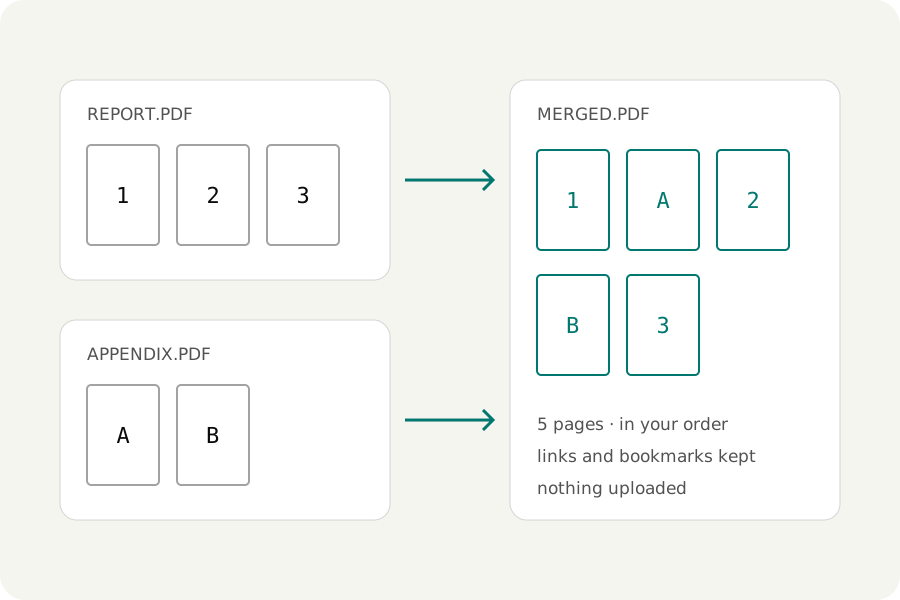
The signature page should be last. The appendix belongs after chapter two. A scanner gave you all the fronts and then all the backs. Each of these is a matter of putting pages in order, and two KeepSimp tools do it in your browser.
Drag the pages where they go.
Open the PDF merger, add the file, and open the Pages view. Every page of the result is a small picture with its position and the file it came from. Drag a page, or a selection of pages, to its new place. The toolbar does the same without dragging: move earlier or later, move to either end, or reverse the order. On a keyboard, Alt with an arrow moves the selection.
Undo and redo cover every change, and Look closely opens a page in the reader, in the order the pages will be merged. Press Merge PDF and download.
Put another PDF in the middle.
Add both files to the merger. In the Pages view, the second file's pages can be dragged between the first file's pages, one at a time or all together. Links inside each file still lead to the right page wherever its pages end up.
In the PDF editor, Pages from a PDF adds every page of another PDF after the page you have chosen. A locked file asks for its password once. Its form fields are drawn into its pages and its bookmarks are left behind; pages you do not want are taken out afterwards.
Add a blank page.
In the merger's Pages view, Add a blank page puts one where you need it, the size of the first page of the file beside it. In the editor's Pages list, an empty page is added after the last chosen page, as large as the page before it. For double-sided printing, the merger can also add a blank page after every file with an odd number of pages, so each file starts on a new sheet.
Fronts and backs from a one-sided scanner.
A scanner that reads one side leaves two files, all the fronts and then all the backs. Add both to the merger and press Alternate pages: the pages are dealt out in turn, first front, first back, second front. A switch reads the last file from its end, which is how the backs come out when the stack is turned over.
Which tool to use.
The merger is made for pages from several files, pictures among them, and for print preparation. The editor is the one to use when you are also changing words or adding things, or when the file has accessibility tags, which it keeps and the merger does not.
Your files stay with you.
Pages are moved and written in your browser. Nothing is uploaded, and once the page has loaded both tools work without a connection.
Further reading
Topics: rearrange PDF pages · reorder PDF pages · organize PDF · move pages in PDF · insert PDF into another PDF · add blank page to PDF · insert page into PDF · alternate pages PDF
A little less theory. A little more doing.
Try it on your own terms, with a free browser tool.
Try the tool