

A little know-how
Sign it, and keep it to yourself.
How to sign a PDF in your browser: draw, type or photograph your signature, place it, fill in the blanks and the date, and download. Free, with no account and nothing uploaded.
By KeepSimp 4 min read
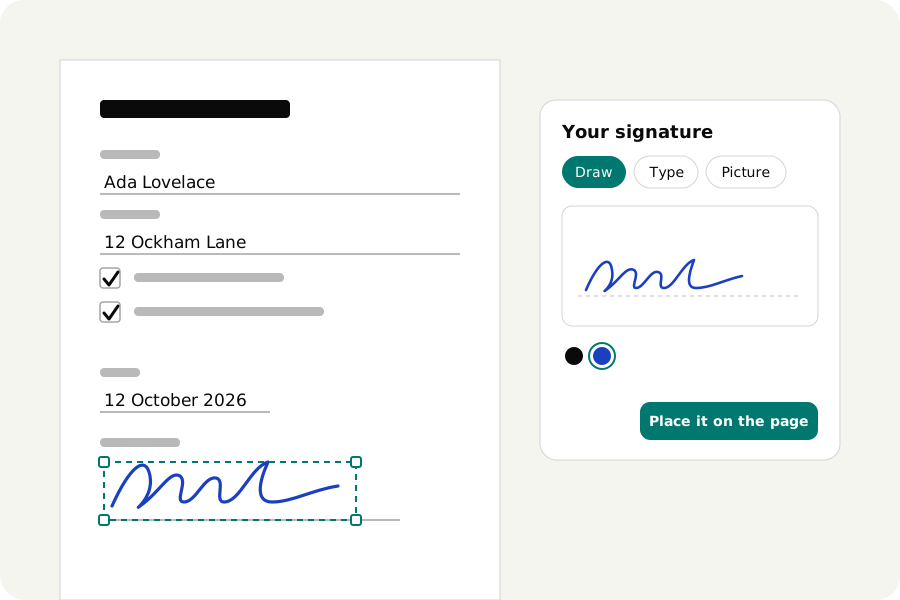
The form says print, sign, scan and return. You have no printer, and the scanner is a phone held over a kitchen table. There is a shorter way, and it does not need to pass your signature and your tenancy agreement through a website's servers on the way. Here is how to sign a PDF with KeepSimp, on your own device.
Three ways to make a signature.
Draw it. A pad opens with a line to sign on; use a mouse, a trackpad, a pen or a finger. It is kept as lines, not as a picture, so it stays sharp however large you make it.
Type it. Write your name and choose one of four hands. This is the tidy option, and the only one that needs no steady hand.
Photograph it. Sign a sheet of plain paper, take a picture, and choose the photo. The paper is taken out of the picture and only the ink is kept, so the signature sits on the form without a grey rectangle around it. A light, evenly lit background works best; if the ink cannot be told from the paper, you are told so.
Put it on the line.
The signature lands in the middle of the page you are reading. Drag it to where it belongs and pull a corner to size it. For a second place, a witness line or the next page, press Sign again.
Initials work the same way and are kept apart from your signature, for contracts that want every page initialled.
Fill in what the form asks.
Most things that need signing need a few more things as well. The text tool types into the blanks: click where the words go and type. The tick tool marks boxes with a tick, a cross or a dot, one press each. A button adds today's date.
This works on any PDF, also one that is only a picture of a form. A form with real fields to tab through is filled in on the same page: click a field and type.
What kind of signature is this?
It is the electronic equivalent of signing paper: your mark, placed on the page by you. For letters, consent forms, applications and most agreements between people, that is what is being asked for.
It is not a certificate signature, the kind made with a digital certificate that proves who signed and that the file has not been changed since. Some filings and regulated contracts require that. If yours does, the editor can do that too: turn on “Sign with a certificate” when you download, choose your certificate file and type its password. It is read on your device and never kept. Whether a signature is enough for a particular document depends on the document and where you are, so ask whoever is receiving it when it matters.
Remembered only if you ask.
By default nothing is kept: close the tab and your signature is gone with it. A switch in the signature window keeps it in this browser's own storage for next time, on this device only, and a button forgets it. It is off each time until you turn it on. Leave it off at a shared computer.
Your documents stay with you.
The file is opened and signed on your own device and is never uploaded; neither is your signature. There is no account, no watermark and no limit on how many documents you sign, and once the page has loaded it works without a connection.
Further reading
Topics: sign PDF · sign PDF online free · add signature to PDF · electronic signature PDF · draw signature · fill and sign PDF · signature from photo · sign PDF without printing · no upload
A little less theory. A little more doing.
Try it on your own terms, with a free browser tool.
Try the tool