

A little know-how
Make a form people can fill in.
Turn a PDF into a form with text fields, checkboxes, radio groups, lists and dates. Move, resize and name its fields on your device, without uploading the file.
By KeepSimp 3 min read
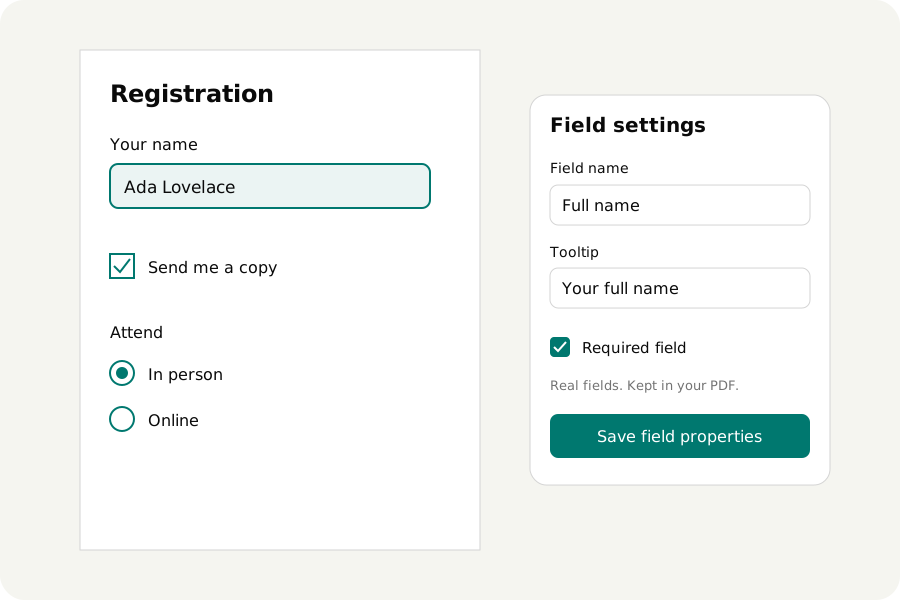
A blank line is room to write on paper. A field is room someone can fill in on a computer. KeepSimp adds those fields to the PDF itself, so the form can be filled here or in another PDF reader. The file stays on your device.
Start with the page you have.
Open Create a fillable PDF form and choose your PDF. Pick a field type and press Add field. Text and multiline text take words; checkboxes take ticks; a radio group lets someone choose one option. Dropdowns and lists keep choices together. A date uses yyyy-mm-dd. A signature place is an empty place, and proves nothing about who signed.
Give each field its place.
New fields begin in the part of the page you can see. Drag a frame to move it and pull a handle to resize. A keyboard works too: the arrows move one point, Shift moves ten, and Alt with an arrow resizes. Each move is a change you can undo.
A radio group has one field name and several places. Its choices are placed in a column to start. You can move and resize each choice separately. Deleting one removes the whole group, so no half-group is left in the file.
A name for the file, a hint for the person.
Field names must be unique. Field settings offers one, which you can change. A new name has no dots: dots separate levels in an existing form's names. A tooltip is the label a person hears or sees while filling it. Required marks a field that ought to be filled; it does not prevent someone from downloading an unfinished form.
A text field can have a character limit, with zero meaning unlimited. A dropdown or list needs choices, one per line. Radio groups need at least two. A list can allow several choices. Save field properties applies a selected field's name, tooltip, requirement and text limit together.
Try your form before you share it.
Download with fields kept as fields. Open that PDF in Fill PDF form, enter a name, tick a checkbox, choose a radio option and use the lists. Download that filled copy too. The values and appearances are in the file, and the fields can still be filled again. Making fields part of the page on download takes that ability away.
PDF viewers differ, so check your result in the programs the people receiving it use. This version creates ordinary AcroForm fields. It does not create XFA forms or calculations, and suggested fields are judged by the lines and boxes a page draws, so check each before you add it. Dates carry a fixed formatting action for external readers, which KeepSimp reads as text and never runs. An empty signature place is only a place: it can be signed into with a certificate at download, here or in another program.
Keep the file where it belongs.
Your PDF is opened, changed and downloaded on your device. No account or upload is needed. A draft is saved in this browser only when you turn on Keep a draft on this device. Nothing is kept by default.
Further reading
Topics: create fillable PDF · PDF form creator · add PDF form fields · PDF checkbox · fillable PDF online free · make PDF form
A little less theory. A little more doing.
Try it on your own terms, with a free browser tool.
Try the tool