

A little know-how
Trim the page, and know what trimming means.
How to crop a PDF in your browser: drag a frame or type the numbers, for one page or all, or make pages A4 or Letter size. And why a cropped page still holds what was cut off. Free, no upload.
By KeepSimp 4 min read
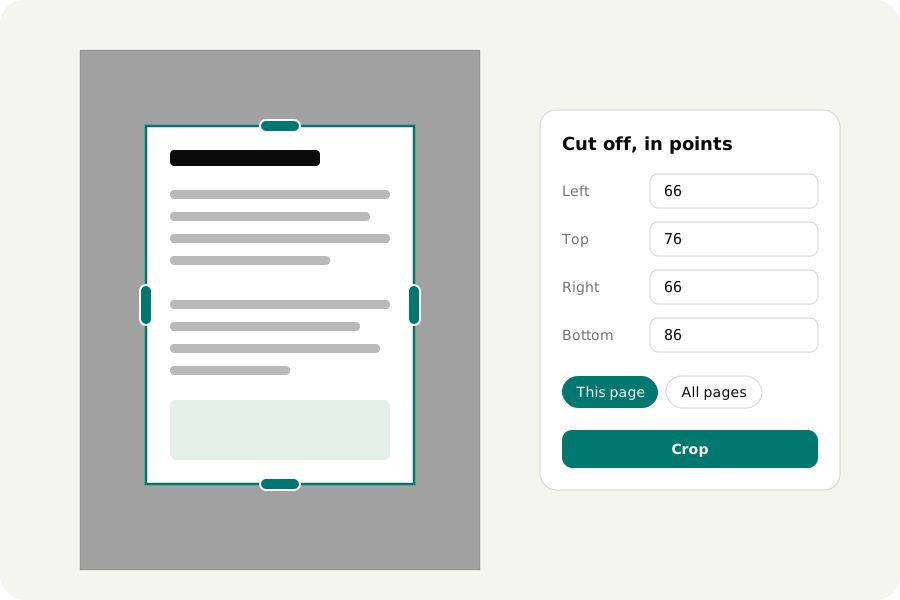
A scan with a black border. A paper with margins so wide that the text is small on a phone. A slide that was exported with half a page of nothing under it. Cropping fixes all three, and most tools that offer it want your file on their server first. Here is how to do it with KeepSimp, on your own device, and one thing about cropping that is worth knowing before you rely on it.
Drag a frame, or type the numbers.
Open the PDF and a frame lies over the first page. Drag an edge inwards and the part that will be hidden is shaded. If you would rather be exact, type how many points to cut off the left, the top, the right and the bottom; a point is a 72nd of an inch, so 72 is an inch and about 28 is a centimetre.
The edges are also buttons. Tab goes from one to the next, the arrow keys move an edge a point at a time, or ten with Shift, and Enter crops. A whole file can be cropped without a mouse.
One page, some pages, or all of them.
The same cut can go on this page, on all pages, or on the pages you choose in the list of pages. What is cut off is counted from each page's own edges as you see it, so one cut fits pages of different sizes, and pages that the file shows turned.
Press another page and the frame moves there. Undo takes a crop back, and Show whole shows a page's whole sheet again, also one that came cropped from somewhere else.
Cropping hides. It does not remove.
A page of a PDF has a sheet and, on it, the part that is shown. Cropping makes that part smaller, and that is all it does, here and in every other program. The words and pictures outside the frame are still in the file. Anyone can show the whole sheet again, and a search still finds the words.
That is what you want when you are tidying margins. It is not what you want when the thing outside the frame is a name, an account number or a signature. For that, the content has to be taken out of the file, not hidden. The editor says this while you crop, and again when you download.
Make every page one size.
A file put together from several places often has pages of several sizes, and a printer does something different with each. Resize makes pages the size of an A4 or a Letter sheet. What is on a page is made smaller or larger to fit and put in the middle; nothing is stretched, and a page that lies on its side gets a sheet on its side.
Links, notes and the fields of a form move and scale with their page, so a resized form can still be filled in.
Your file stays with you.
The file is opened and cropped on your own device and is never uploaded. There is no account, no watermark and no limit on pages, and once the page has loaded it works without a connection. Before the download, the result is read back and checked.
Further reading
Topics: crop PDF · crop PDF online free · trim PDF margins · cut PDF page · resize PDF pages · PDF to A4 · PDF to Letter size · crop box · no upload
A little less theory. A little more doing.
Try it on your own terms, with a free browser tool.
Try the tool