

A little know-how
Every frame worth keeping, as a picture.
Take frames out of an MP4, MOV, WebM or MKV in your browser: every frame, one every few seconds, the first of each shot or the moments you choose, at full quality. No uploads.
By KeepSimp 4 min read
A still for a thumbnail, the frames of a moment to study, a picture of every shot for a storyboard: taking frames out of a video is a common job, and most sites want the whole video uploaded first. KeepSimp's frame extractor reads the frames from the file in your browser, at the video's full quality, and hands you the pictures.
Open it and choose the part.
Open the Video frame extractor and drop an MP4, MOV, WebM, MKV or MPEG-TS file of any length. If you only want frames from part of it, trim it first: the frames are taken only from what the trimmer keeps, and several parts can be kept at once.
Six ways to choose the frames.
Every few seconds takes a frame at the start of each stretch, from half a second to a minute apart: right for a quick look through a long video. Spread evenly takes a number of frames from the middle of equal slices, so you never get the black frame many videos open with.
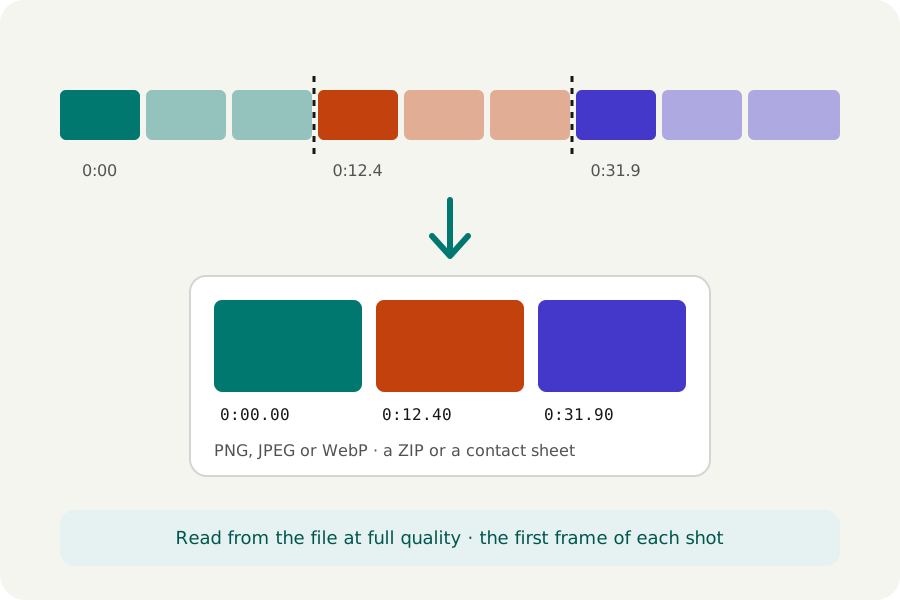
Each new shot compares every frame with the one before and keeps the first frame after each cut: one picture for every shot, ready for a storyboard or a thumbnail. Clear cuts finds only hard cuts; Softer changes too finds fades as well. A camera flash or a shot shorter than half a second is not taken for a new one.
Keyframes takes the frames the video is built from, which are quickest to read. Every frame takes all of them, or one in 2, 5, 10 or 30, up to 1,000 at a time. At moments takes exactly the moments you type, such as 0:05, 1:12.5, or the one the player shows.
Full quality, in the format you need.
Each frame is decoded from the file itself, never captured from the player and never from a copy written again, so a picture is as sharp as the video. The file's own turn is applied, so a phone video comes out upright.
PNG keeps every pixel as decoded and makes the largest files. JPEG and WebP are much smaller, at the quality you choose. Pictures are made at the video's own size, or with the shorter side brought down to 1080, 720, 480 or 360 pixels, never enlarged. They are named by their moment, which sorts them in order, or by their frame number.
Choose the ones you want and save them.
The frames appear as they are made, each with its moment. Untick the ones you do not need, then download them all as one ZIP, any one by itself, or the chosen ones on a contact sheet: one picture with every frame in rows and its moment under each, handy for reviewing footage at a glance.
All of it happens in your browser. The video is not uploaded, nothing is sent anywhere, and the pictures are made on your device.
Further reading
Topics: extract frames from video · video to jpg · video to png · video to images · screenshot from video · scene detection · contact sheet · thumbnails from video
A little less theory. A little more doing.
Try it on your own terms, with a free browser tool.
Try the tool