

A little know-how
Everything KeepSimp keeps on your device, in one list.
See every file, draft and engine KeepSimp keeps in your browser, how much space each takes, and remove any of them with one button. Works in Chrome, Edge, Firefox and Safari.
By KeepSimp 4 min read
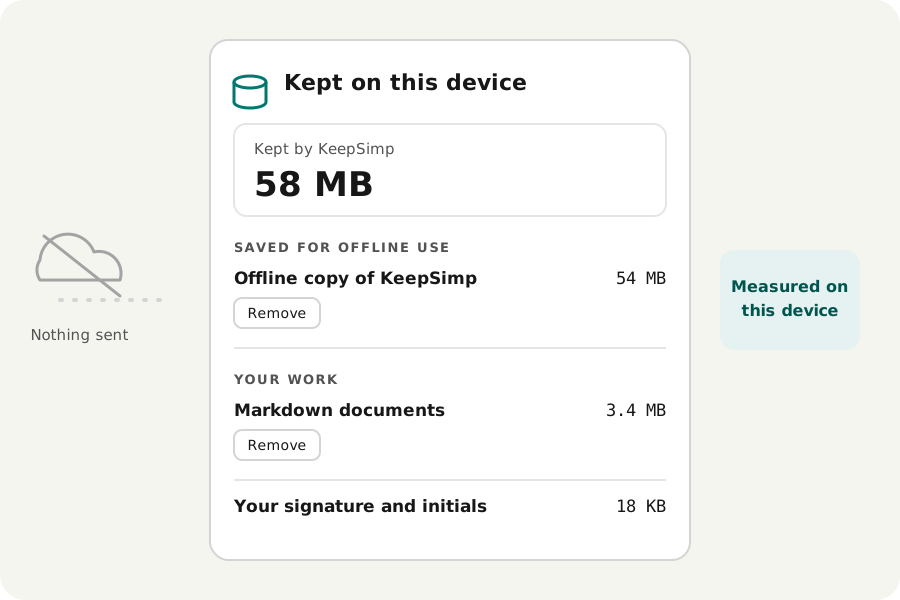
KeepSimp never sends your files anywhere, but it does keep a few things in your own browser: a copy of the site so the tools work offline, the engines some tools download the first time you use them, drafts you asked it to keep, and a signature you asked it to remember. The Kept on this device button, at the top of every tool page, lists all of it with the size of each part and a button to remove it. Here is what each part is and when it is worth keeping.
Where to find it.
Open any tool and look at the top bar, beside the light and dark switch: the button with a small database drum is Kept on this device. It opens a panel with the total KeepSimp keeps, the browser's own count for the site and how much space the browser allows it, then every part in three groups: saved for offline use, your work, and what is remembered for you.
The sizes are measured in your browser when you open the panel. Nothing about them is sent anywhere, and looking never creates anything: a draft you never kept shows as Nothing kept.
Why storage, and not memory?
The button used to show how much memory the page was using. Only Chrome and Edge report that, and the number left out the background workers and engines where the tools do their real work, so a video being compressed could look calm. It told you little you could act on.
Storage is different. It stays on your device after you close the tab, it is what fills a phone, and every browser can measure it: Chrome, Edge, Firefox and Safari, on iPhone too. So the panel now answers the question that matters: what is this site keeping here, and do I still want it?
Saved for offline use.
The offline copy is KeepSimp's own pages, scripts, fonts and codecs, a few tens of megabytes, kept so the tools open without a connection. It holds none of your files. While a new version waits for its old pages to close, you may briefly see two copies; the older one goes by itself.
Some engines are too big to send to everyone, so they are saved the first time you use them: the languages for recognising the words of scans (about 1 MB to start, and up to a few megabytes for each language), the speech recognition models (about 107 MB, or 280 MB for the larger one) and the noise removal model (about 3 MB). Each is listed on its own, so you can let go of the speech models and keep the rest.
Your work: drafts and video files.
Drafts are kept only when you switch them on. The PDF editor can keep the file you are editing and your changes, the Markdown editor your open documents with their pictures and versions, and the voice recorder a take in progress, so a closed tab loses nothing. Each switch starts off.
The video editor writes the video it is making to the browser's private file storage, so a long video does not fill the memory. Those files go when their page closes; the panel shows any left behind, and a file an open video editor is still writing is left alone.
Remembered for you.
A few small things are kept because you asked: your signature and initials when “Remember this signature on this device” is on, the certificates you trust for checking signatures, and the name you sign PDF comments with. They take a few kilobytes, but they are personal, so they are worth removing on a computer other people use.
Removing a part, and keeping the rest.
Every part has its own Remove button, and it asks once more before anything goes, because a removed draft cannot be brought back. Only that part goes: removing a signature leaves your drafts, and removing the speech models leaves the offline copy.
The offline copy is the one that comes back. After you remove it, the next tool page you open online saves a fresh copy, so the tools keep working offline. That makes removing it a quick way to free space, or to clear out an old version.
Asking the browser to keep it all.
When a device runs low on space, browsers may clear a site's storage on their own, drafts and offline copy included. Where the browser allows it, the panel offers to ask for this site's storage to be kept. The browser decides; installing KeepSimp as an app makes a yes more likely.
Doing it from the browser instead.
Every browser can also remove a site's data in its own settings. That removes everything at once, the theme you chose included, while the panel lets you pick. Developers can see the same stores in the browser's developer tools, under Application in Chrome and Edge or Storage in Firefox and Safari.
Further reading
Topics: browser storage · site data · clear site data · how much storage does a website use · offline website storage · IndexedDB · cache storage · storage estimate · persistent storage · privacy
A little less theory. A little more doing.
Try it on your own terms, with a free browser tool.
Open the tools