

A little know-how
One long recording, in parts you can find.
Split a long recording, podcast, lecture or mix into parts in your browser: every few minutes, into equal parts, at markers or at its pauses. Nothing is uploaded.
By KeepSimp 3 min read
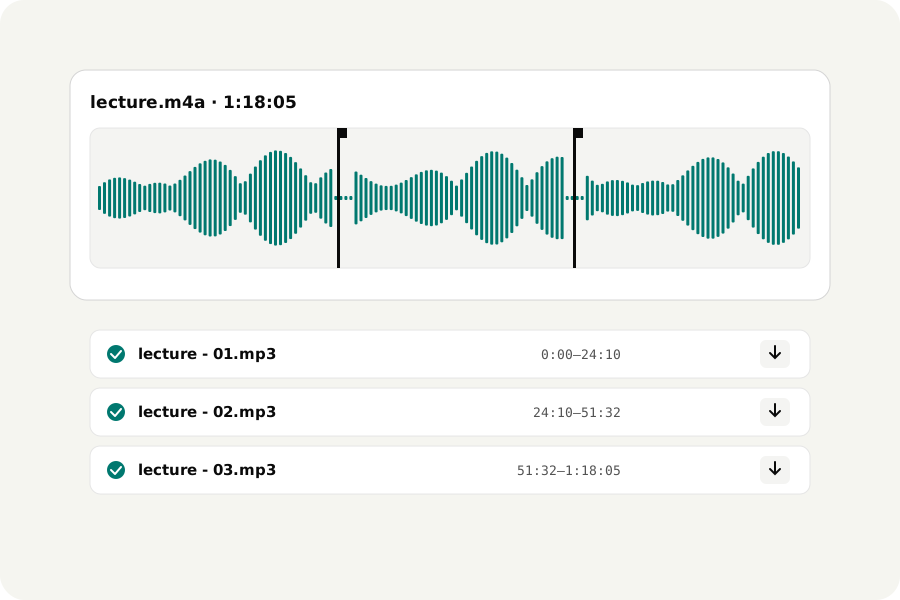
A two-hour lecture, a recorded meeting, a DJ mix, an audiobook chapter: some players skip badly through long files, some sites take only short ones, and finding your place is easier in parts. Splitting should not mean uploading the recording or cutting it by hand ten times.
How to split.
Open the Audio splitter and drop the file. Choose how to split it: every few minutes, into a number of equal parts, at markers, or at its pauses. The parts are listed with their times before anything is written; press Split and each part is written, checked and named in order, ready to download one by one or as a ZIP.
At markers, or at the pauses.
To choose the places yourself, play the file and press M (or Add a marker) where each part should start. To let the sound choose, split at pauses: every pause longer than half a second, one or two seconds ends a part at its middle, and the pauses can be left out of the parts altogether, which suits a talk or a set of songs.
You can trim, fade and normalise the file first: the parts are made from it as you edited it, and each part is cut to the sample.
On your device.
The file is read and the parts written in your browser; nothing is uploaded and there is no account. The file itself is never changed.
Further reading
Topics: split audio · audio splitter · split mp3 into parts · split audio by silence · cut audio into segments · split podcast · split long recording
A little less theory. A little more doing.
Try it on your own terms, with a free browser tool.
Try the tool