

The front of the class on one screen.
Put a timer, a fair name picker, random groups, a noise meter, a traffic light and the day's instructions on one screen. No student logins, nothing sent.
By Suraj Kumar4 min read
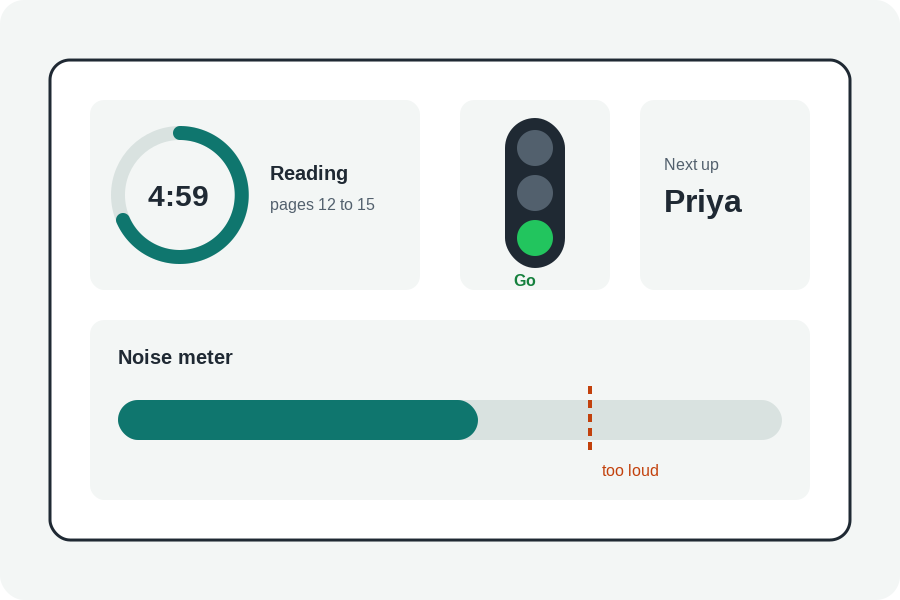
A projector or a smart board at the front of the room can hold everything the class needs to see: how long is left, what to do, who answers next and how loud is too loud. The Classroom screen puts those on one page, in your browser, with nothing for pupils to sign in to.
Say what you need, then go full screen.
The page asks one question: what do you need on the board? Timer and instructions is the usual; Pick a name, Make groups and Noise meter each show one thing large; Everything shows all seven widgets. The answer only chooses which widgets show, and Change the board adds or takes off any of them and moves them earlier or later.
Full screen fills the projector, and everything on the board grows with it: the timer's digits, the name picked and the instructions are sized to the space they have, so they can be read from the back of the room. It works in the light and the dark theme, and on a phone as one column. While the board shows, the page asks the browser to keep the screen on, where the browser allows it.
A timer that keeps time, and a fair pick.
The timer is the Timer tool's own clock. It keeps the moment it started rather than counting ticks, so switching to another tab or window to show a video loses no time, and it rings at the end and says when it finished. Space starts and pauses it from the keyboard.
Paste your class list one name a line. Pick a name uses your browser's cryptographic random numbers, the same draw as the name picker wheel, so each name still in the draw is as likely as any other. With Take a name out once picked on, as it starts, everyone is picked once before anyone is picked twice, and the board says when everyone has had a turn.
Groups deal the same list into groups of nearly the same size, never more than one apart: 23 names in 4 groups makes groups of 5 or 6. Choose a number of groups, or the people in each for pairs and threes.
Show how to work, and how loud the room is.
The traffic light shows red, amber or green, and always says it in words too (Stop and listen, Get ready, Go), so nobody has to tell the colours apart. The work symbols show silent work, whisper voices, a partner or groups, each drawn with its words.
The noise meter listens through the computer's microphone once you press Start, and shows the level against a line you set. Nothing it hears is recorded or kept, and the level is relative to that microphone, not a sound level in decibels.
Nothing on the board is sent anywhere. The board is kept in this browser only when you turn on Keep this board on this device, and kept boards are offered the next time, never opened by themselves.
Further reading
Topics: classroom screen · classroom timer · random name picker for teachers · smart board tools · classroom display · teacher tools free
A little less theory. A little more doing.
Try it on your own terms, with a free browser tool.
Try the tool