

Small enough to send.
Make a PDF small enough to email, in your browser with nothing uploaded: pick Email and sharing or a size, keep the text sharp, or split it if it will not fit.
By Suraj Kumar4 min read
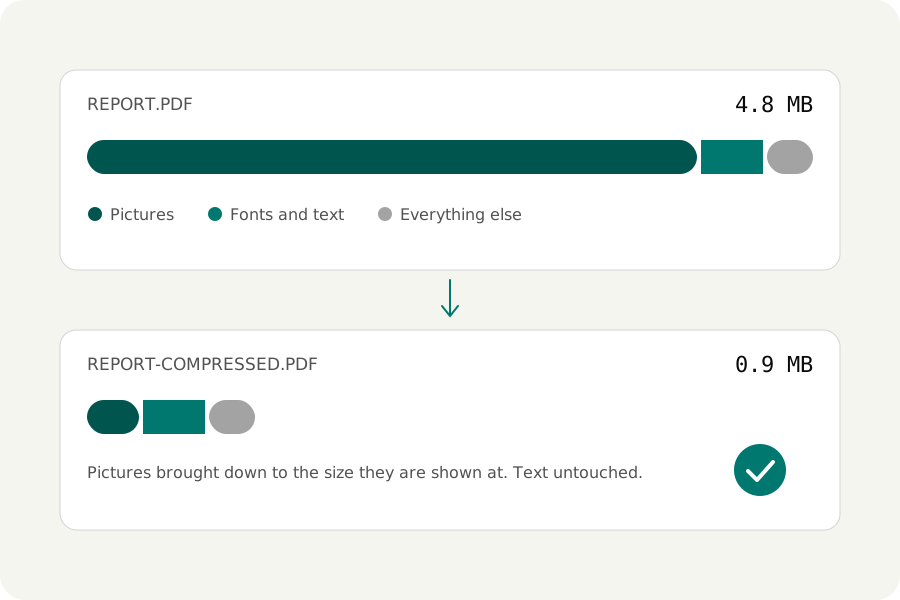
The email will not send, or it arrives as a link instead of an attachment. Mail services cap the size of what you attach, and a PDF full of photos or scans passes that cap easily. Here is how to bring it under, on your own device, without turning the words into a blur.
Know the limit you are aiming for.
Gmail lets a personal account send up to 25 MB of attachments; a larger file is put in Google Drive and sent as a link. Work and school accounts have the limit their administrator sets. Other mail services set their own, so check their help pages. The limit counts every attachment in the email together.
Answer one question.
Open the PDF compressor and add the file. It asks what the file is for. Email and sharing makes it smallest: pictures are brought down to the size a screen needs and saved at a lower quality. Everyday makes it much smaller while it looks the same, and is a good first try.
If you have a number in mind, turn on Must be under a size? and choose 2 MB, 1 MB, 500 KB or 200 KB, or type your own. More options also offers 5, 10 and 25 MB. The compressor writes the file at gentle settings first and harsher ones only as needed, and keeps the gentlest result that fits.
Scans shrink the most.
A scanned page is one large picture. Under More options, Scanned pages can rebuild each one as sharp black-and-white letters over a soft background (Text and paper), or as black and white alone, which suits plain print. Both are usually far smaller than the scan, and the letters stay crisp.
Text that is already text is never turned into a picture, so it stays sharp and searchable.
When it will not fit.
Some files cannot reach a size and stay readable. The compressor then says how far over the result is. You can let pictures go blurrier, or split the file: the PDF splitter's By size makes parts that each stay under 5, 10, 20 or 25 MB, or a size you type, to send in several emails.
On a phone.
The compressor works in a phone's browser too, with files of up to 100 MB each and 200 MB together; a computer takes 300 MB each. Very large pictures are left as they are on a phone, which has less memory to decode them.
Look before you send.
Read the smallest print in the result: a date, a figure in a table, a signature. Any page can be compared with the original under a divider you can drag. Keep the original, and remember that a digital signature does not survive compression.
Further reading
Topics: PDF too large to email · compress PDF for email · reduce PDF size for email · email attachment too large · Gmail attachment size limit · make PDF smaller to send · compress PDF to 10 MB · shrink PDF for email
A little less theory. A little more doing.
Try it on your own terms, with a free browser tool.
Try the tool