

A signed PDF, and the size it has.
Why compressing a digitally signed PDF breaks its signature, how to tell what kind of signature you have, in your browser with nothing uploaded, and what to do.
By Suraj Kumar4 min read
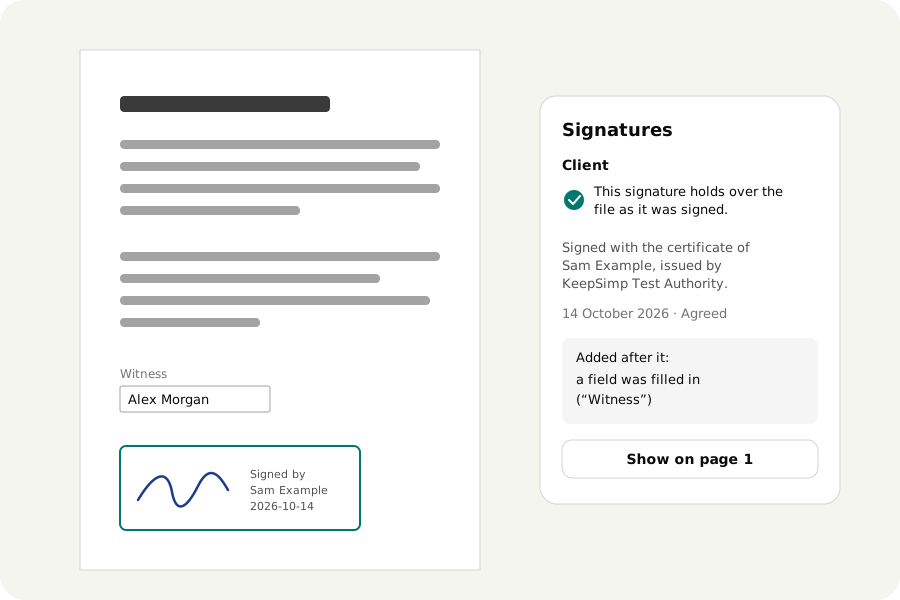
A certificate, a tax document or a contract arrives digitally signed, and the upload form says it is too large. Compressing it seems the obvious fix. With a digital signature it is not, and no tool can make it so. Here is why, and what you can do instead.
Why the signature cannot survive.
A digital signature, the kind made with a certificate (in India often called a DSC), seals a fingerprint of the file's exact bytes. Compressing writes the file again with other bytes, so the fingerprint no longer matches, and a program that checks signatures will say it does not hold. This is the signature working as intended: it shows that the file changed after it was signed.
So the honest answer to compressing a signed PDF without losing the signature is that it cannot be done after signing, by any tool. The KeepSimp PDF compressor warns you before it starts when a file is signed.
First, find out which kind you have.
Many PDFs called signed carry only a picture of a signature: drawn, typed or scanned onto the page. That is page content like any other and comes through compression unharmed.
To find out, open the file in Verify a PDF signature. It lists every digital signature, whether each still holds and whose certificate made it. If the list is empty, the file has no digital signature to lose.
What to do instead.
Ask the sender. The person or office that signed it can compress the document first and sign it afterwards; signing a small file keeps it small.
Ask the receiver. An office that sets a size limit often has another way to send larger files, or accepts the signed file in parts.
If you are the one who signs, compress first. Make the file small with the compressor, then open it in the PDF editor and turn on Sign with a certificate when you download. The signature then covers the small file.
If a copy is enough, compress it knowing the signature will no longer hold, and say so to whoever receives it. Keep the signed original.
Splitting and merging change it too.
Taking pages out of a signed file, or joining it with others, also writes new bytes. The PDF merger and splitter keep the signature's picture as a stamp and remove the signature itself, so no reader reports a broken signature, and they say so.
Your documents stay with you.
Checking, compressing and signing all happen in your browser. The file, and a certificate file if you sign with one, are never uploaded, and nobody is asked over the network about the certificate.
Further reading
Topics: compress signed PDF · compress digitally signed PDF · reduce size of signed PDF · compress PDF without losing digital signature · digital signature invalid after compress · compress PDF with DSC · signed PDF too large
A little less theory. A little more doing.
Try it on your own terms, with a free browser tool.
Try the tool