

Paste anything, and see what it is.
Paste text and see whether it is Base64, percent-encoding, HTML entities, Unicode escapes or punycode; read it in chained steps and look inside every character.
By Suraj KumarUpdated 4 min read
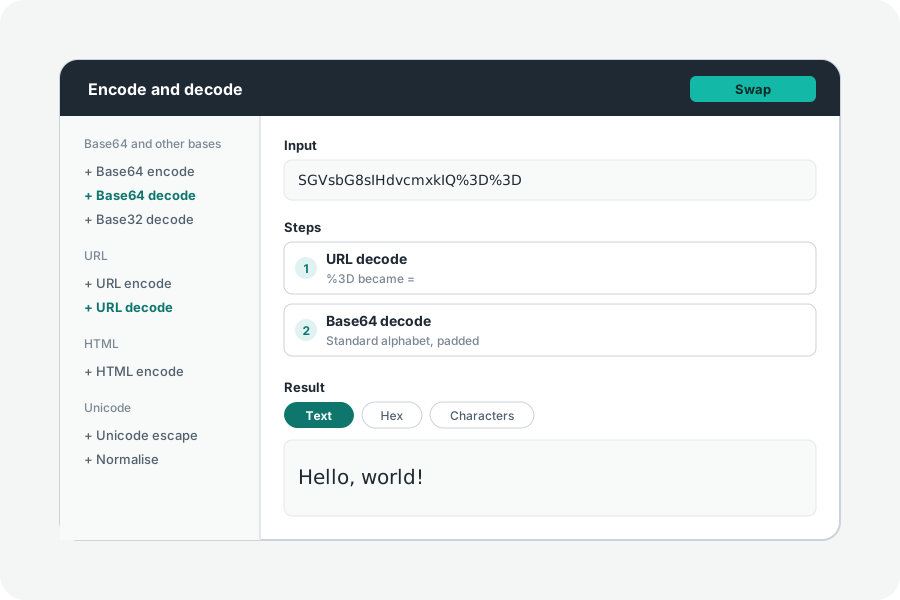
A token in a log, a link that has been encoded twice, a string that will not compare equal: most of a developer's encoding problems start with not knowing what a piece of text is. The Developer toolkit says what it may be, reads it in steps you can see, and shows every character it holds.
Paste it, and see what it may be.
Paste text into the box at the top of the toolkit. It says what the text may be, best guess first, and why: Base64 or Base64url, Base32, hex, percent-encoding, HTML character references, Unicode escapes, a domain in punycode, a data URL, or text hiding characters that cannot be seen. A guess is judged by the look of the text and by whether reading it gives readable text or a known file, and it is only offered: press it to open the text with the steps that read it.
Steps you can see, one after another.
Text is often encoded more than once: Base64 put in an address, an address put in JSON. Add steps, and each works on what the one before gave: URL decode, then Base64 decode, then read as UTF-16. Every step says what it let pass, such as line breaks a Base64 decode passed over, and when one cannot go on it says why and where.
Swap makes the result the input and turns the steps around, so encoding becomes decoding: the quickest check that something reads back as it was. A link copies the steps and the input to share.
Inside every character.
The Characters view lists each character with its code point, its name from Unicode 17.0, its category and script, and its bytes in UTF-8 and UTF-16. It marks the ones that cannot be seen (zero-width spaces, bidi controls, tag characters) and those Unicode lists as easily taken for another, and says when text mixes scripts, as the Cyrillic а in аpple.com does.
IDs and hashes too.
The IDs panel makes UUIDs of every version, ULIDs, NanoIDs, KSUIDs and ObjectIds by the thousand, and reads any of them, or a Discord or X ID, back to when it was made. The Hashes panel hashes text and files of any size with 27 algorithms, makes HMACs, checks a download against its checksum, and makes and checks bcrypt, Argon2 and scrypt password hashes. Paste a UUID or a hash at the top and the toolkit opens the right panel.
Files too.
Open a file to write it as Base64 or a data URL. When a result is a file, a PNG or a PDF hidden in a Base64 string, it is recognised by its first bytes, previewed, and downloaded as what it is.
Nothing leaves your browser.
Everything is worked out on your device: what you paste or open is never sent anywhere, and nothing is kept when you leave. A share link carries what you typed after the #, which browsers never send to a server.
Further reading
Topics: encoder decoder online · base64 decode · url decode · html entities · unicode escape · cyberchef alternative · detect encoding · zero width characters · punycode · hex dump
A little less theory. A little more doing.
Try it on your own terms, with a free browser tool.
Try the tool