

Send an API request and read the answer.
Send GET, POST and every other request to an API from your browser, with headers, JSON or form bodies, sign-in and cURL, and see exactly why one is blocked.
By Suraj KumarUpdated 5 min read
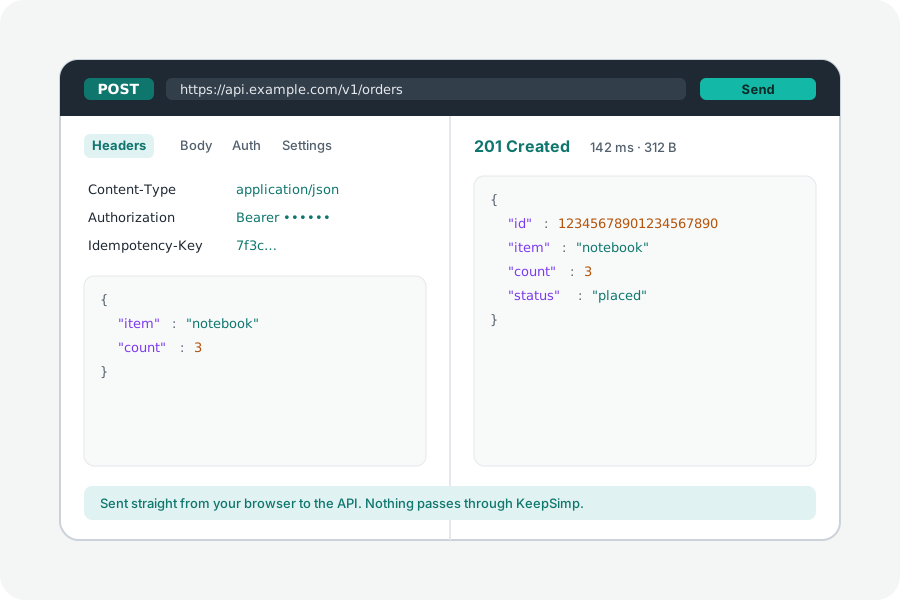
Trying an endpoint usually means opening a desktop app or writing a script. The API client does it in a browser tab: type the address, add headers or a body, send it, and read the status, headers, body and timings, all from your own browser.
Write it, send it, read it.
Open the API client and type an address, such as api.example.com/v1/items; a server on your own computer, such as localhost:3000, works too. Choose the method, add query rows, headers and a body (JSON, text, XML, HTML, form fields, multipart with files, or a whole file) and sign in with a user and password, a bearer token or an API key. Press Send, or Ctrl or ⌘ and Enter.
The answer shows its status in words, how long it took and its size. JSON is tidied with every digit of every number kept as it came, so 12345678901234567890 is never rounded; pictures, sound, video, PDFs and HTML are previewed, and any body can be saved as a file.
From cURL, and back.
Paste a cURL command into the address, such as one copied from your browser's developer tools, and it becomes the request: its method, headers, body, sign-in and time limit. Whatever cannot be carried into a browser, a proxy or a client certificate, is named rather than dropped without a word. Copy any request back as a cURL command or as JavaScript's fetch.
Collections, environments and history.
Save requests into collections and folders, open them in tabs, and find any request you sent in the history. Write {{name}} anywhere in a request and its value comes from the environment you choose, such as Local or Live, from the collection or from the globals; a token marked secret is never kept. Collections and history stay on your device only when you switch that on.
Open a Postman collection or environment, an Insomnia export, an OpenAPI or Swagger description or a HAR file, and save a collection back as a Postman file. Sign in with OAuth 2.0 (with PKCE), AWS Signature v4 or a JWT signed on your device, and let a folder's requests share its sign-in.
Check answers, chain requests, run collections.
Add checks as rows, such as Status equals 200 or JSON at $.items[0].id exists, and take a value such as $.access_token into a variable for the next request. Or write scripts with Postman's pm.test and pm.expect: they run sealed off from this site and the network.
Run a whole collection in order, once or once for each row of a CSV or JSON file, and save the result as JUnit XML for your CI. Copy any request as code in 18 languages and tools, from cURL and Python to Go, Rust and Swift; twelve of them are checked by running them against a real server.
GraphQL, WebSockets and event streams.
Choose GraphQL and ask the API for its schema: fields are offered as you type, the query is checked against it, and the docs list every type. Choose WebSocket to connect, send text or JSON and read every message in a log; an answer that is an event stream shows its events as they arrive.
Why a request is blocked, in plain words.
A page may read another site's answer only when that site says it may, with Access-Control-Allow-Origin (CORS). This protects the API's users and holds for every web page, this one included; for any request that is not simple, the browser first asks the server with an OPTIONS request, a preflight. Before you send, the client says whether there will be one and why.
When a request fails, a browser tells a page only that it failed. The client works out the rest: it sends one HEAD request that needs no leave, which tells it whether the server answered at all, and so whether the cause is CORS, a server that cannot be reached, an http address from an https page, or the time running out. For CORS, it lists the headers the server would have to send.
What a browser will not send.
Browsers set some headers themselves and leave out any a page gives them, such as Cookie, Host and Origin; the client marks them and keeps them in the cURL copy. Chrome sends its own User-Agent. An answer's headers are shown to a page only when the server allows it, and Set-Cookie never is. How long finding the server, connecting and waiting took is shown when the API sends Timing-Allow-Origin.
Nothing goes through KeepSimp.
Requests go straight from your browser to the API, and KeepSimp has no server in between: it never sees the addresses, the keys or the answers. Sign-in details stay in the window and are gone when it closes.
Further reading
Topics: api tester online · rest client · postman alternative · test rest api online · curl to request · cors error · import postman collection · collection runner · graphql client · websocket tester
A little less theory. A little more doing.
Try it on your own terms, with a free browser tool.
Try the tool