

A little know-how
Give your agent the chores. Keep your files at home.
Batches, chains of jobs and design-system checks: how to have Claude Code or Codex do file chores with KeepSimp's tools, on your own computer.
By KeepSimp 6 min read
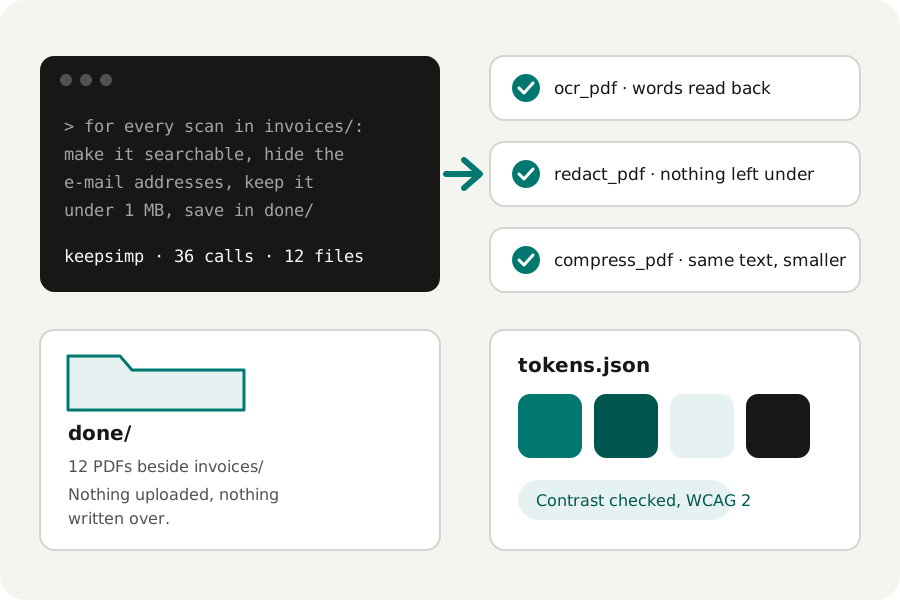
One file is quick to do by hand. Forty are an afternoon. An agent such as Claude Code or Codex can do the forty, if it has tools it can trust. With the KeepSimp bridge it uses the same engines as KeepSimp's pages, on your computer, and every result is checked before it is handed back.
Connect it once.
Add the bridge to your agent, then ask in plain words. It works in the folder you start the agent in. To let it reach another folder, add --allow and the folder's path to the command.
The first start downloads the bridge and, when Google Chrome is not installed, a browser of about 150 MB. After that it starts in seconds.
claude mcp add keepsimp -- npx -y keepsimp-mcp

[mcp_servers.keepsimp]
command = "npx"
args = ["-y", "keepsimp-mcp"]
startup_timeout_sec = 120
tool_timeout_sec = 300
Do the same thing to a whole folder.
This is where an agent saves the most time. It lists the folder itself and calls a KeepSimp tool for each file, so a job you would repeat forty times becomes one sentence. Say where the results go: they are saved there, or beside each file, and a file that is already there is never written over.
Be exact about what you want. A size, a format, a loudness or a page range gives the same result for every file; a word like smaller leaves the choice to the agent.
Compress every PDF in contracts/ to under 2 MB
and save them in contracts/small/.

Resize every photo in shoot/ to 640, 1280 and 1920
pixels wide, as AVIF and WebP.

Convert every WAV in interviews/ to MP3 at -16 LUFS.

Format every JSON file in fixtures/ with sorted keys.
Put several jobs into one request.
A request can name steps in order, and the agent passes each result on to the next tool. A pile of scans can be recognised, have its e-mail addresses redacted, get page numbers and be compressed. A recording can have the silence at its ends trimmed and its long pauses shortened, be brought to a loudness, be written down as subtitles and become a video with its waveform.
Each tool checks its own result before it hands it over: recognised words are read back, a redaction is refused while a letter can still be read under its mark, a split part must have its pages, and a sound is decoded again. When a step fails, the agent is told why in words, and nothing half-made is saved.
For each scan in invoices/:
make it searchable, redact the e-mail addresses,
number the pages and keep it under 1 MB.
Save the results in invoices/done/.
Keep a design system honest.
Design tokens are a list of colours, and a list is something an agent can work through. Ask it to read your tokens file and check every text colour on every background it is used on. The contrast tool gives the WCAG 2 ratio with transparency counted, suggests the nearest lightness that reaches 3:1, 4.5:1 or 7:1, and shows how a pair may look with protan, deutan and tritan colour vision and in grayscale. Those are approximate previews, not a prediction of every person's vision.
It can also build what the system needs: a scale of eleven tones from one brand colour, a mix of two colours in OKLab, a gradient with a fallback for older browsers, or a palette written as CSS variables, Design Tokens JSON, a Tailwind theme or a PNG strip. It can find the main colours of a logo, read one pixel of a picture, and give a company's published colours with their source. Values outside sRGB keep their wide-gamut numbers and say when they were mapped.
The agent still needs your judgement. A passing ratio is one rule of readable text, not proof that a whole screen is accessible.
Read tokens.json and check every text colour against
every background it is paired with, at 4.5:1.
List the pairs that fail, with the nearest colour that passes.

Make a scale of eleven tones from #00786f
and write it as Design Tokens JSON.

Find the five main colours of brand/logo.png
and check each on white.
Write it down, and run it again.
A request that works can be kept. Claude Code reads a project's CLAUDE.md and Codex its AGENTS.md, so a line there such as: before a release, check the contrast of tokens.json and compress the PDFs in docs/, becomes something you ask for in three words.
Keep the inputs in the project and the results in a folder of their own, and the same request gives the same files each time. Look at the first results before you trust a long batch.
What it will not do.
Signing a PDF, placing a signature and recording sound are not given to agents: they are a person's own acts. The bridge reads and writes only inside the folders your agent works in and those you allow, and its browser opens the KeepSimp site and refuses every other address, so your files are never uploaded.
Recognising scans and transcribing can mishear, and the agent can misread what you meant. Read what it made, especially before you send it to someone else.
Further reading
Topics: automate pdf tasks with ai · batch process files with claude code · codex mcp automation · ai agent productivity · check design tokens contrast · batch compress pdf locally · mcp file tools
A little less theory. A little more doing.
Try it on your own terms, with a free browser tool.
Open the tools