

Sign it with your finger, in the browser.
Sign a PDF on your phone in the browser, with no app and nothing uploaded: draw with a finger, type or photograph your signature, place it and download.
By Suraj Kumar4 min read
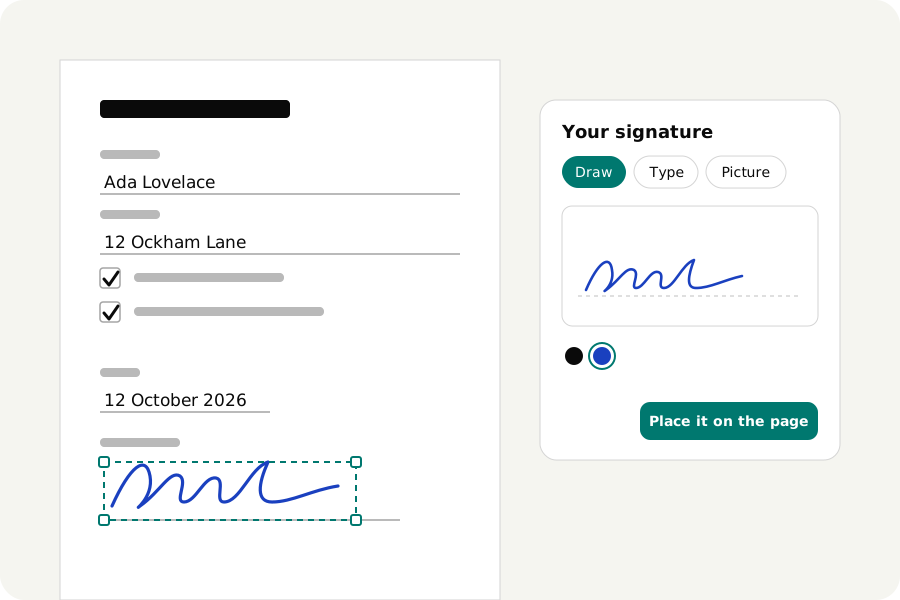
The form came by email, it needs signing today, and the only thing to hand is your phone. You do not need a printer or an app. Sign PDF runs in your phone's browser and signs the file there.
Open the file in the browser.
Save the PDF from the email to your phone first. Then open Sign PDF in Safari, Chrome or another browser and choose the file; the browser offers your phone's files. The page opens with the signature window ready.
Draw, type or photograph your signature.
Draw it on the pad with your finger. The signature is kept as strokes, so it stays sharp at any size.
Or type your name and choose one of four handwriting fonts, which needs no steady hand. Or sign a sheet of plain paper, photograph it, and choose the photo: the paper is taken out and only the ink is kept. Light, even paper works best.
Initials are made the same way and kept apart from the signature.
Put it on the line.
The signature lands in the middle of the part of the page you can see. Put a finger on it to drag it onto the line, and pull a corner to size it; handles are larger when a finger is the pointer. A finger on empty paper scrolls the page, as usual.
The rest of the form is filled in on the same page: the text tool types where you tap, the tick tool marks boxes, and one press adds today's date. A form with real fields is filled in by tapping a field.
More than one signature.
For a second place, a witness line or the next page, press Sign again and place another. Contracts that want every page initialled take the initials the same way. Every step can be undone, and the PDF on your phone is not changed: the signed file is a new download.
Download it and send it.
Press Download. The file is checked, then saved: on an iPhone to the Downloads folder in the Files app, on most Android phones to Downloads. Attach it to your reply from there.
A phone takes PDFs of up to 100 MB here, which covers almost any form. Your signature is not kept unless you turn on the switch that remembers it on this phone, which starts off every time.
What kind of signature this is.
It is a mark on the page, the equivalent of signing paper, which is what most letters, forms and agreements ask for. It is not a certificate signature and does not prove who signed. When a document needs one, ask the receiver what they accept.
Nothing leaves your phone.
The PDF and your signature are opened and written in the browser and never uploaded. Once the page has loaded it works without a connection.
Further reading
Topics: sign PDF on iPhone · sign PDF on Android · sign PDF on phone · sign PDF without app · sign document on phone free · draw signature on PDF on phone · sign PDF on mobile
A little less theory. A little more doing.
Try it on your own terms, with a free browser tool.
Try the tool