

Your text, as an audiobook.
Turn a document into a spoken MP3 with a chapter for each heading, in your browser with nothing uploaded. Free, with natural voices and no account.
By Suraj Kumar5 min read
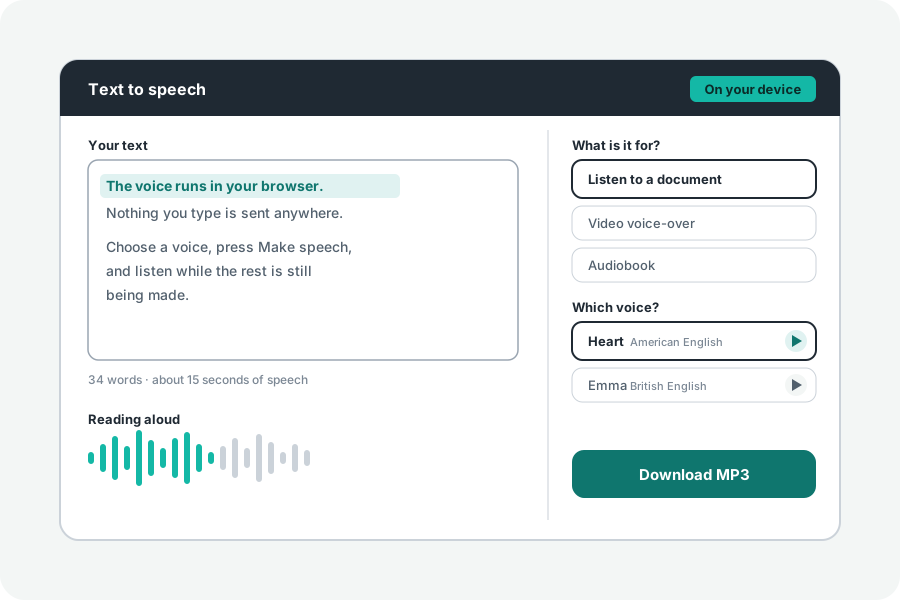
A report, a story or your own book is easier to take in on a walk. Text to speech reads a document aloud with a natural voice that runs in your browser and saves it as one MP3, with a chapter at each heading so you can jump between them.
Open the document, answer Audiobook.
Open Text to speech and open your file: plain text, Markdown or a Word document. Headings in a Markdown or Word file stay headings. Answer What is it for? with Audiobook, which leaves longer pauses between paragraphs and writes a chapter for each heading. Choose a voice, hearing each first, and press Make speech.
It starts reading at once while the rest is made. When it is finished, Download saves the MP3.
Listen to the start while it is being made. If a voice or a pace is not right, Stop halts it within a sentence; choose again and make it anew. Under More options, speed goes from half to twice as fast, and the pauses after sentences and paragraphs can be set in steps. Subtitles timed to each sentence can be saved too, which helps when the audiobook goes with the text.
Chapters, and where they show.
With two or more headings, each becomes an ID3 chapter in the MP3, named by the heading; text before the first heading becomes a chapter named by its first words. Podcast apps and players that read MP3 chapters show them as a list to jump to.
Apple's apps read chapters of another kind, so they may play the MP3 straight through without them; the page says so too.
From a PDF.
Text to speech does not open PDFs. Turn the PDF into a Word file with PDF to Word first: it marks larger lines as headings, judged by their size, so look over them before you make speech. A scanned PDF needs its words read first, which the PDF converter can do.
Very long books.
One run takes up to 120,000 letters, about two hours of speech; longer text is refused with a sentence, never cut off. Make a long book a part at a time, then put the MP3s together with Join audio, which writes a chapter for each file in the joined MP3.
Add the title, author and a cover picture to the finished file with Edit audio tags.
A computer voice, said as one.
The voices come from Kokoro, an open model, and the page always says they are computer-made. They read English only and can say names, numbers and abbreviations wrongly, so listen to the first chapter before you share it. Your text never leaves your device.
Further reading
Topics: text to audiobook · make an audiobook from text · document to audiobook · word to audiobook · mp3 with chapters · text to speech audiobook · pdf to audiobook
A little less theory. A little more doing.
Try it on your own terms, with a free browser tool.
Try the tool